selfhosted services
Services I host myself at home or on a root serverOn this page I list all the services I'm selfhosting in my homelab or on external servers.
INDEX- My recent network layout
- OpnSense Router
- Two Proxmox nodes
- NAS Proxmox container (Alpine Linux)
- SyncThing Proxmox container (Alpine Linux)
- Proxmox Atuin container (Alpine Linux)
- Proxmox homeserver container (Alpine Linux)
- Proxmox Wireguard VPN container (Debian)
- Proxmox "chat" container (Debian)
- Proxmox Evennia MUD/MUSH container (Debian)
- My Raspberry Pi Zero 2 W infoscreen (RPi OS "Trixie")
- 4x Raspberry Pi 4 Incus cluster (RPi OS "Trixie")
- Mox Mailserver VPS (FreeBSD)
- Gemini/Gopher/Finger/Smolnet VPS (FreeBSD)
- How I update my homelab/VPSs
- That's it
My recent network layout
Here's a ASCII layout of my home network. I had to switch to a different router, because my old Linksys WRT 1900 ACS broke. And because changing such an integral part of the network as the main router, I decided to create a completely new network layout, and this time I did the setup as well conceived as I could.
┌────────┐
│DSL     │
│Modem   │
└──┬─────┘
   │
┌──┴────────────────┐VLAN30T┌─────────────┐
│OPNSense Router    ├───────┤   Proxmox   │
│                   │VLAN35T│   Cluster   │
│                   │       └─────────────┘
│    mainrouter     │
│                   │       ┌─────────────┐
│                   │       │   FireTV    │
└──┬────────────────┘   ┌───┤   Stick     │
   │                    │   └─────────────┘
┌──┴────────────────┐   │VLAN40U
│                   ├───┘
│     switch01      │
│                   ├─────────> VLAN70T,80T
└──┬────────────────┘
   │VLAN40T,50T,55T,70T,80T
   │  ┌─────────┐  ┌─────────┐  ┌─────────┐
   │  │ Zigbee  │  │ FireTV  │  │ Desktop │
   │  │ Router  │  │ Cube    │  │ PC      │
   │  └────┬────┘  └────┬────┘  └────┬────┘
   │       │VLAN70U     │VLAN40U     │
┌──┴───────┴────────┐   │            │
│                   ├───┘            │
│     switch02      │ Untagged       │
│                   ├────────────────┘
└──────────┬────────┘
           │
           │VLAN50T,55T     ┌─────────────┐
           └────────────────┤Raspberry Pi │
                            │Cluster      │
                            └─────────────┘
   ┌──< VLAN70T,80T (switch01)
   │
   │
┌──┴────────────────┐       ┌─────────────┐
│OpenWRT Router     │       │WLAN:        │
│                   │VLAN70U│Charlie      │
│                   ├───────┤      Foxtrot│
│    wlanrouter     │       │             │
│                   │       │IoT & Printer│
│                   │       │             │
└──────────┬────────┘       └─────────────┘
           │
           │                ┌─────────────┐
           │                │WLAN:        │
           │VLAN80U         │SierraLima   │
           └────────────────┤             │
                            │             │
                            │Laptops &    │
                            │Smartphones  │
                            └─────────────┘
In the VLAN definitions T stands for "Tagged"
and U for "Untagged"
- Untagged: The main lan is untagged (desktop PC only)
- VLAN30: My 2 Proxmox nodes
- VLAN35: Proxmox VMs and containers
- VLAN40: Streaming Hardware (FireTVs)
- VLAN50: Experimental RPi Incus Cluster hosts
- VLAN55: Incus Containers
- VLAN70: IoT and printer, all insecure devices
- VLAN80: Secure WLAN for my laptops and smartphone
OpnSense Router
My OpnSense router is the center of my network. It does all the firewalling, DNS, DynDNS, DNSBL blocking (like a PiHole) with the internal unbound DNS server, DHCP(v6) and all the VLAN routing.
I'm still using the ISC DHCP server, because the Kea DHCP server doesn't inject any new connected devices to the DNS server. But the ISC DHCP server seems to be deprecated and will soon be removed from the OpnSense system. I hope I can make use of the newly built in Dnsmasq DNS and DHCP service, while keeping my unbound DNS server, because Dnsmasq doesn't provide DNSBL lists. We'll see how this update turns out.
The router is a "Glovary PFSense Router" which I swapped PFSense for OpnSense, because PFSense doesn't seem to get regular updates. The hardware is a Glovary Firewall N100 Router Appliance which provides 6x 2.5GbE ports i226V with an Alder Lake-N 12th Gen N100 4C/4T 3.4GHz processor, 8 GB DDR5 RAM, 2x M2 NVMe Slots with one 512GB SSD installed, 1x USB3.2, 4x USB2.0, 1x USB-C and a HDMI port.
[Top]Two Proxmox nodes
I'm hosting a Proxmox cluster with two nodes, which serves my other services mostly as LXC containers, to keep the resource usage low. I use Relax-and-Recover (ReaR) to make backup ISO images of the Proxmox system disks itself, so I can recover in case of a desaster. You can read about it here.
First node: Lenovo ThinkCentre M900 Tiny with an Intel Core i7-6700
4C/8T @ 3.4GHz and 32GB DDR4 RAM.
It's connected to an 6bay USB HDD case with 5x 4TB Seagate Ironwolf NAS HDDs set
up with a ZFS raidz2 to take backups of all containers and also holds my NAS
data. The other 512GB USB-SSD connected to it holds my SyncThing data.
Second node: my former laptop with an AMD Ryzen 7 4800H 8C/16T @ 4.2GHz max and also 32 GB DDR4 RAM. There's no other hardware attached to it.
The ZFS raidz2 storage pool is partly exported via NFS to my second node to get its backups, too. I've locked down the VLAN for the Proxmox system nodes itself on my router, so the other VLANs can only access SSH and the GUI on port 8006. I hope this is enough for securing the nodes and NFS.
The LXC containers are running on a separate VLAN.
[Top]NAS Proxmox container (Alpine Linux)
One Container running on my first node ("nas.srv") provides my Network-Attached-Storage. Because I like simplicity, it only exposes SSH/SFTP which is enough for taking BorgBackups, Git repos and my video collection. I don't need a big OpenMedia Vault or similar to view some videos. I mapped the according directories to my raidz2 ZFS pool.
[Top]SyncThing Proxmox container (Alpine Linux)
My SyncThing LXC container ("syncserver.srv") distributes my configuration files for all my workstations, docs, pictures, VimWiki, my redterminal.org site and other things to all my laptops/workstation. The folders to sync are mapped to a directory on the first Proxmox node, where an 512GB USB-SSD is mounted. I do a BorgBackup of the data to my NAS and also to my Hetzner Storage Box as an external backup (all encrypted) every night at 05:00.
[Top]Proxmox Atuin container (Alpine Linux)
This is a container ("services".srv") with some bigger storage room to host
my Atuin shell history sync and backup database
server, which syncs my shell history to all my workstations.
It's also made to serve some recurring processes like watering my Gemini
Astrobotany plant 2 times a day. It also served my own rgsrv Gemini server in the past for
testing purposes. I wrote it mainly to learn the Rust language.
Proxmox homeserver container (Alpine Linux)
"homeserver.srv" serves a Node-Red instance and a mosquitto mqtt server for my home automation with my "Amazon FireTV Cube" (yes, I know it's a privacy nightmare...). I'm also using a "Philips Hue hub" as a zigbee router, which is in my locked down "IoT" VLAN, which has the purpose to take all my IoT devices and my printer to restrict them as much as possible with my OpnSense firewall. So it for example can't connect to the internet or the other local VLANs.
[Top]Proxmox Wireguard VPN container (Debian)
My "vpn.srv" container provides a Wireguard VPN access point for my GrapheneOS Pixel8a Smartphone, which I also use as a hotspot, so I can make use of my local services and also use the DNS blocking of my home network when I'm using my laptops on my way outside.
[Top]Proxmox "chat" container (Debian)
The "chat.srv" LXC runs all my chat applications in tmux sessions, eg. irssi for the tilde.chat IRC servers and profanity for my XMPP account on envs.net. It also runs my tmux sessions for the tintin++ MUD client to connect to the Evennia MUD/MUSH I'm currently developing.
[Top]Proxmox Evennia MUD/MUSH container (Debian)
I'm currently developing an Evennia MUD/MUSH, which was a lot of work yet, but I'm not sure when or if I should open it up for the world. It could be a big failure. It's also not a MUD in the classical sense, not even a roleplaying MUD/MUSH. It shall serve as a multiuser virtual text environment, which should be mainly build by it users. So if I make it available, I hope that all the players also become "builders" to shape the virtual world. If I open it up, I'll also make the source code available to get pull request from users who want to use the "real" powers to build a MUD/MUSH by programming their rooms, objects, scripts and commands in Python3.
[Top]My Raspberry Pi Zero 2 W infoscreen (RPi OS "Trixie")
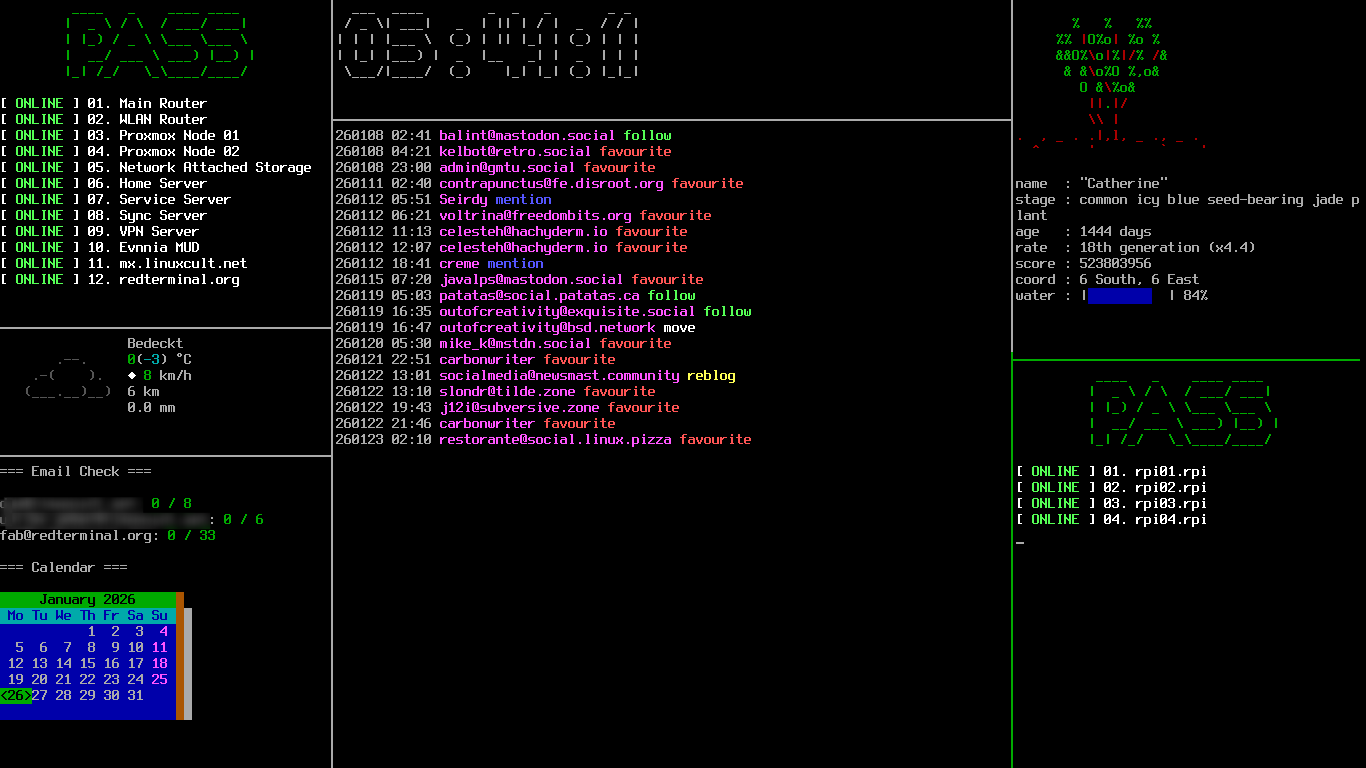
I have an infoscreen in my room, which serves all kinds of information about my home network and other things. It shows if all services are up, a local weather report, if there are new emails, a figlet clock, my Fediverse notifications, my Gemini Astrobotany plant and the status of my 4x Raspberry Pi 4 Incus cluster.
[Top]
4x Raspberry Pi 4 Incus cluster (RPi OS "Trixie")
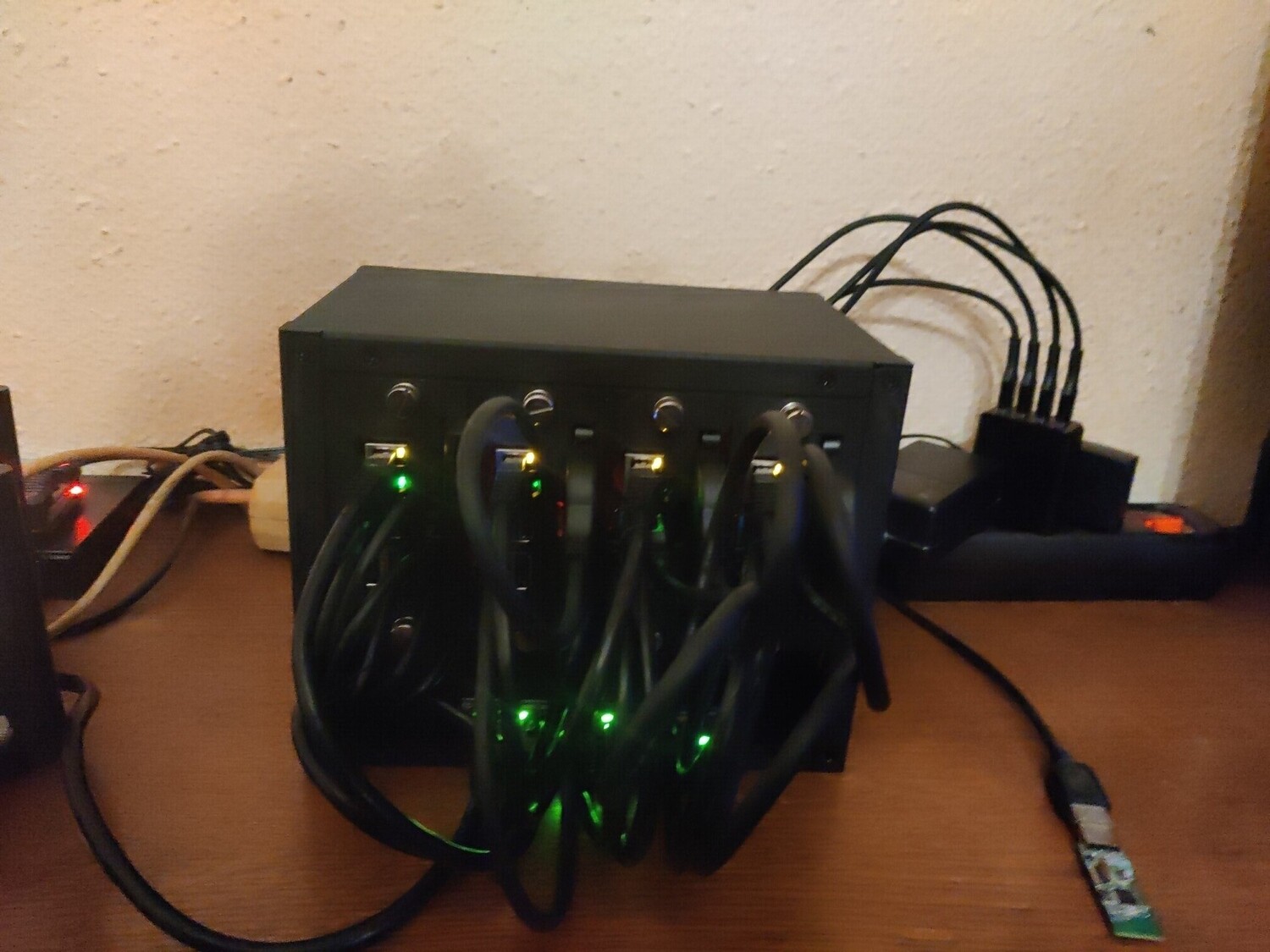
My RasPi Incus cluster containing 4x Raspberry Pi 4's, which run the Incus system- and application-container and VM manager. I just built it to tinker with the Incus environment on some Raspberry Pis.
[Top]
Mox Mailserver VPS (FreeBSD)
I run a FreeBSD VPS mailserver with the Mox Email Suite on the smallest root server (RS 1000) that Netcup provides, although they've upgraded their offers since I began to rent mine, I think. I do a BorgBackup every night to my local NAS and to my external Hetzner Storage Box.
[Top]Gemini/Gopher/Finger/Smolnet VPS (FreeBSD)
There is another root server at Netcup (also an "RS 1000"), which hosts my Gemini/Gopher/Finger/Smolnet server. It also runs FreeBSD. I use gmid for my Gemini Capsule, gophernicus for my Gopher Hole, nginx as a reverse proxy for kineto to serve my Gemini Capsule on the web, go-gopherproxy as a gopher proxy written by myself in Go, to serve my Gopher Hole on the WWW through nginx too, and my own Finger scripts. My Finger scripts and gophernicus are served through the inetd internet daemon.
[Top]How I update my homelab/VPSs
I do a complete homelab update on every Sunday (mostly).
- At first I send my ZFS raidz2 pool on my first Proxmox node incrementally with ZFS send/receive to my offline backup ZFS HDD.
- Receive the recent "Relax-and-Recover" ISO images, which are created automatically on Sundays at 04:00 with rsync to my desktop PC (they are also stored on my ZFS Pool).
- Update my complete Proxmox cluster with an Ansible playbook.
- Update my infoscreen with another Ansible playbook.
- Update my OpnSense router manually from the web GUI
- Update my complete Raspberry Pi 4 Incus cluster also with an Ansible playbook
- Update my 2 FreeBSD-15.0-RELEASE VPS manually with
- $ pkg update
- $ pkg version -vL=
- $ pkg upgrade
- $ reboot # if neccessary
That's all for my Sunday update duties, which run mostly without problems.
[Top]That's it
These are all the services I host at home or on an external root server. I believe this is already a lot of stuff, but I have still some capacities on my Proxmox cluster. So if you have a good idea what else I should host, have a comment, suggestion or some tips, please shoot me an email.
I hope you maybe got some inspiration or at least had fun reading about my homelab/VPSs.
Best wishes,
~dan